Web designBy Federico Noya · 9 min read
WordPress in 2026? When it makes sense, when it doesn't, and what "headless" means
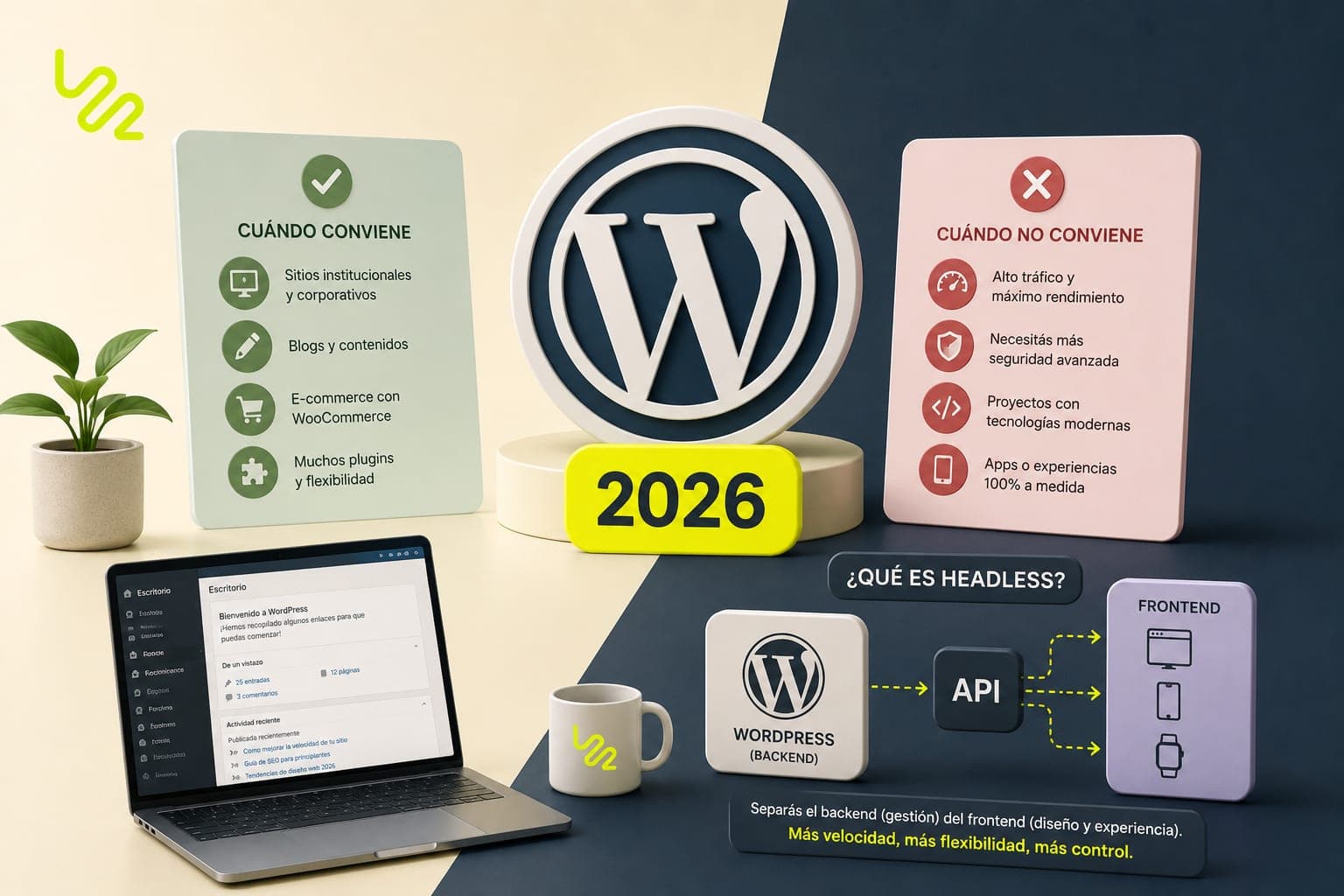
Does WordPress make sense in 2026? Yes for institutional sites, blogs, and projects with living content; no for campaign landing pages or complex applications. Roughly four out of every ten sites in the world run on WordPress according to industry surveys, and it still stirs up extreme opinions: for some it's the tool that democratized the web, for others it's shorthand for slow, hacked sites. Both sides have a point, and both are exaggerating.
After years building (and rescuing) WordPress sites, here's our honest verdict: when it makes sense, when it doesn't, what it costs, and what that third way called headless — which people ask us for more and more — actually is.
Key takeaways
- WordPress is still the best option in 2026 for institutional sites and blogs where the team edits content regularly, thanks to its self-management and ecosystem.
- A well-built WordPress site — lightweight theme, few plugins, good hosting — can be fast; the typical combo of page builder plus twenty plugins can't.
- WordPress demands mandatory monthly maintenance: the vast majority of hacks come in through outdated plugins.
- It's not the right call for campaign landing pages or applications with complex business logic: forcing it ends up costing more than custom development.
- Headless WordPress combines the admin panel your team already knows with a modern Next.js frontend that loads in under 2 seconds.
- A professional institutional site on WordPress costs between USD 1,500 and 3,500, plus USD 10–30 monthly hosting and maintenance.
Is WordPress still relevant in 2026?
WordPress is an open-source CMS (content management system) that powers around 40% of the web — a share that's stayed stable for years. That has two practical consequences: there are thousands of professionals who know it, and there's a plugin for almost any need. The right question isn't whether it's still relevant — it is — but whether it's the right tool for your specific project. Let's break it down.
What WordPress does better than anyone
- Real self-management: your team edits copy, uploads photos, and publishes posts without depending on a developer. For blogs and sites with living content, it's still unbeatable.
- A massive ecosystem: there's a plugin for almost any need — bookings, memberships, multi-language, complex forms — without building from scratch.
- Low cost of entry: a well-built institutional site on WordPress costs less than its custom-built equivalent.
- Nothing locks you in: it's free software, and thousands of professionals know it. If you switch providers tomorrow, your site is still yours and anyone can pick it up.
Where it starts to hurt
Performance
WordPress isn't slow; a badly built WordPress is. The typical combo — multipurpose theme, page builder, and twenty plugins — produces pages that load in 6 seconds on mobile. You can build a fast WordPress, but it takes discipline: a lightweight theme, few plugins, and good hosting. Google measures that experience with Core Web Vitals, and an overloaded WordPress site tends to fail them — with a direct hit to rankings.
Security and maintenance
Being the world's most-used CMS makes it the world's most-attacked CMS. An unpatched WordPress is an open door: the vast majority of hacks come in through outdated plugins. It's not optional — it needs monthly maintenance, backups, and up-to-date updates. The cost of prevention is low; the cost of cleaning up a hacked site — with Google flagging you as an unsafe site — is high, and it always hits at the worst possible time.
Plugin debt
Every problem solved by "just installing something" adds weight, potential conflicts, and one more dependency to maintain. Two years in, plenty of sites are carrying 30 plugins when only 10 are actually in use. The free plugin is never free: you pay for it in speed. Our rule before installing one: ask whether anyone will still be using that feature in six months.
When does WordPress make sense?
WordPress makes sense when content is the heart of the site and your team is going to touch it regularly:
- Institutional sites and blogs where the team is going to edit content regularly.
- Projects with a tight budget that need functionality that's already been solved (bookings, catalogs, multi-language).
- Media outlets, portals, and corporate blogs where publishing has to be as simple as writing a document.
- Businesses that already have a WordPress site running well: migrating just to follow a trend is throwing money away.
When doesn't WordPress make sense?
And it doesn't make sense when the project calls for a different tool from the start:
- Campaign landing pages: for a static page, WordPress is a truck hired to deliver a letter.
- Web applications with complex business logic: forcing WordPress to be something it isn't ends up costing more than custom development.
- Projects where speed is critical and there's nobody going to handle the maintenance.
The mistakes we see most when building a WordPress site
- Picking the theme based on the demo: multipurpose themes look great in the showroom and load half a ton of code your site will never use.
- Solving everything with a page builder: drag-and-drop is convenient today and technical debt tomorrow — bloated HTML, slow load times, and permanent lock-in.
- Hiring the cheapest hosting on the market: it's the number one cause of the slow WordPress sites that land in our inbox.
- Not setting up automatic backups: until an update goes wrong or a hack gets in. The backup is the cheapest insurance policy on this whole list.
- Leaving the site without a technical owner: a WordPress site with nobody in charge of maintenance ages badly and fast, no matter how flawless the launch was.
What is headless WordPress, and when does it make sense?
Headless WordPress is an architecture where WordPress works purely as the admin panel, and the visible face of the site is built separately, with a modern framework like Next.js. The CMS is left "without a head" — hence the name — and the frontend takes its place: it serves pre-rendered content and loads in under 2 seconds. It's the option that combines the best of both worlds.
How it works in practice
Your team keeps loading posts, photos, and pages into the same WordPress panel as always — nobody needs retraining. The frontend pulls that content via API and publishes it as static pages served from a CDN. Security bonus: WordPress stays hidden from the public, which drastically shrinks the attack surface.
Who is it for?
For brands where performance and SEO really matter: high-traffic media outlets, companies competing for tough search terms, stores with a lot of content. It costs more than a traditional WordPress build — in practice, it's two pieces of software working together — so for a small institutional site it's usually overkill. It's the setup most requested by people who've already suffered through a slow WordPress site.
WordPress, SEO, and AI engines: what changes in 2026
WordPress doesn't rank — or fail to rank — on its own: it hands Google, and generative engines like ChatGPT or Perplexity, whatever you load into it. Its big advantage is that it makes publishing content regularly easy, and content is still the raw material of SEO and GEO. Its risk is technical: if the site loads slowly or the theme generates messy code, even the best content strategy underperforms.
How much does a WordPress site cost in 2026?
A professional institutional site on WordPress costs between USD 1,500 and 3,500, in line with any well-built institutional site. Add USD 10–30 a month for hosting and a monthly maintenance plan, which on this platform is not optional. A headless build with Next.js costs more because of the dual architecture, and a migration from an existing WordPress site is quoted based on the state of the site: a tidy body of content is not the same job as ten years of accumulated page-builder clutter.
WordPress isn't good or bad: it's a tool. The result depends on who's using it and what for.
Frequently asked questions
Is WordPress free?
The WordPress software is free and open source, but a professional site isn't: you pay for hosting (USD 10–30 a month), eventually premium plugin or theme licenses, and the design and development work. "Free" applies to the engine, not the whole car. A professional institutional site on WordPress costs between USD 1,500 and 3,500.
My WordPress is slow — do I have to migrate to another platform?
Not necessarily. Most slow WordPress sites get fixed without migrating: a lightweight theme, plugin cleanup, image optimization, and better hosting. Migrating makes sense when the problem is structural or when you need performance that traditional WordPress can't reach — that's when you evaluate headless or custom development.
What happens if I don't update WordPress?
An unpatched WordPress site accumulates known, publicly documented vulnerabilities: most hacked sites get in through there, especially via outdated plugins. The typical symptoms are injected spam, weird redirects, and "not secure" warnings from Google. Prevention — monthly updates and backups — is simple and cheap compared to the cleanup.
Does WordPress work for an online store?
Yes, with WooCommerce, the most widely used e-commerce solution built on WordPress. It works very well for catalogs with specific needs: configurable products, B2B, multi-language. For more standard stores, platforms like Tienda Nube (a Shopify-like platform popular in Latin America) or Shopify solve it faster. A professional online store, on any platform, costs between USD 3,000 and 8,000.
How much does it cost to turn a WordPress site into headless?
It depends on the state of the current WordPress site. If the content is well structured, the project looks like building a new Next.js frontend that reuses your existing panel; if there are years of page builders and shortcodes piled up, there's cleanup work first. As a reference point, headless sits above a traditional institutional build and is quoted as a closed project after an audit.
Can I manage WordPress myself without knowing how to code?
Yes: editing copy, uploading photos, publishing posts, and building pages with the native blocks doesn't require code, and that self-management is the main reason WordPress still leads the pack. What's worth delegating is the technical side: updates, security, performance, and structural changes. An editor account for your team, maintenance for professionals.
Got a slow WordPress site, or trying to figure out if it's the right platform for your next project? At loco22 we work with both traditional and headless WordPress: tell us about your case and we'll give it to you straight — with a free audit included — on whether you should optimize what you've got, migrate to headless, or take a different approach.
Found this useful? Add us as a preferred source in Google.